

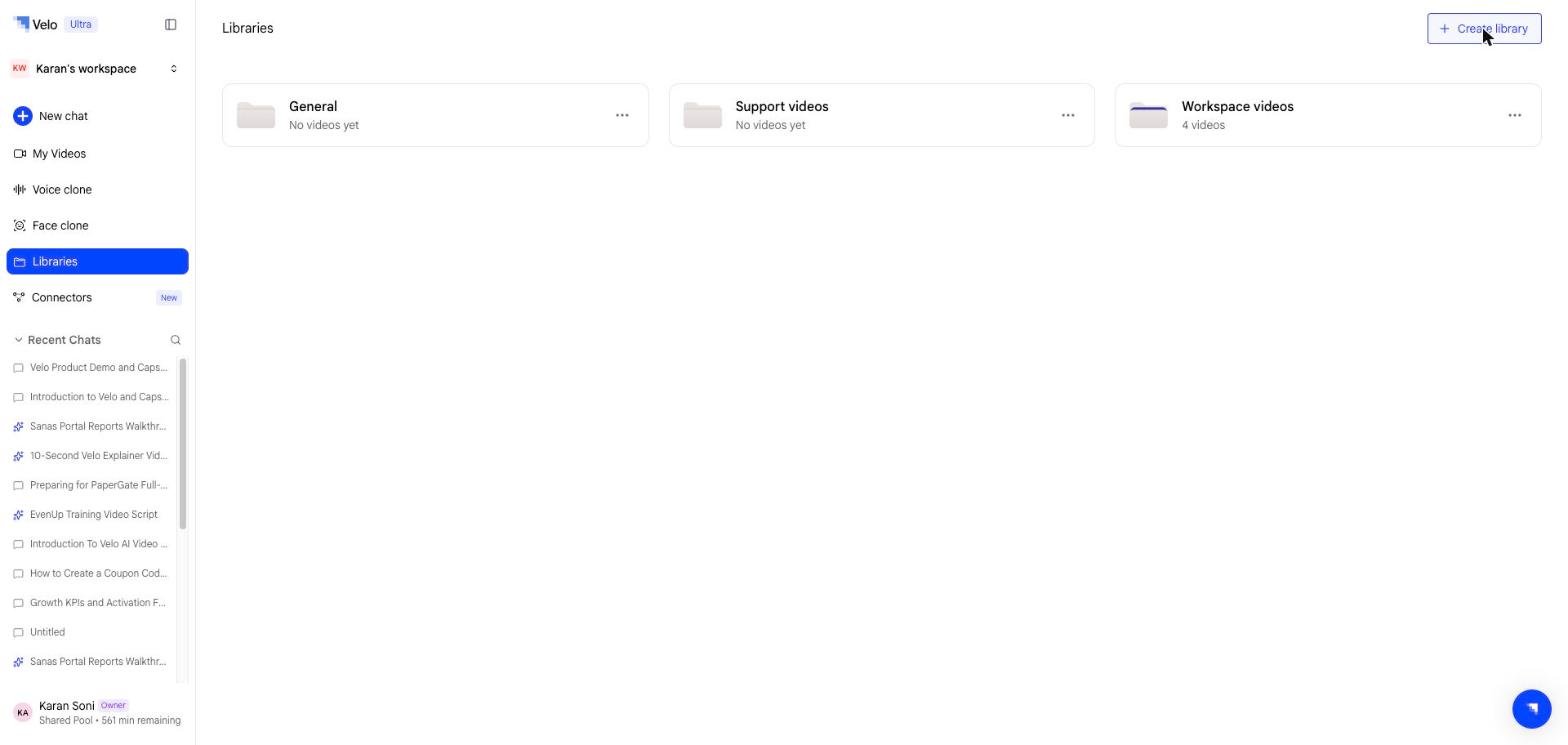
How libraries work
- Libraries are flat — one level only. No sub-libraries or nesting.
- Every workspace starts with a default General library that all members can publish to immediately.
- All the members can create additional libraries regardless of roles.
- A single video can be published to multiple libraries simultaneously.
Public vs Private libraries
Each library has a visibility setting:
Private libraries are completely hidden from non-members of library — they don’t appear in the sidebar or library list for anyone who isn’t invited.
Creating a library
Step 1: Select Libraries in the sidebar. Step 2: Select Create library, top right. Step 3: Name your library and choose its visibility (Public or Private).Publishing videos to a library
Publishing and sharing are two independent actions in Velo:- Publish adds a video to one or more libraries so teammates can find it
- Share generates a public link for external viewers (see Sharing)
Browsing a library
Select a library on the Libraries page to open it. Each library card shows its name and how many videos it holds, with a three-dot menu for renaming, sharing, and deleting. Each video in a library has its own page with a video player and a Docs tab — an AI-generated written summary you can generate on demand.Managing libraries
From the library view, you can:- Remove videos from the library
- Rename or delete the library (via the three-dot menu)
- Manage private library membership