Generator VLO transforms uploaded documents and links into a structured script format. This script is organized into discrete units known as scene cards, which serve as the functional building blocks for the final video production.

Script Segmentation

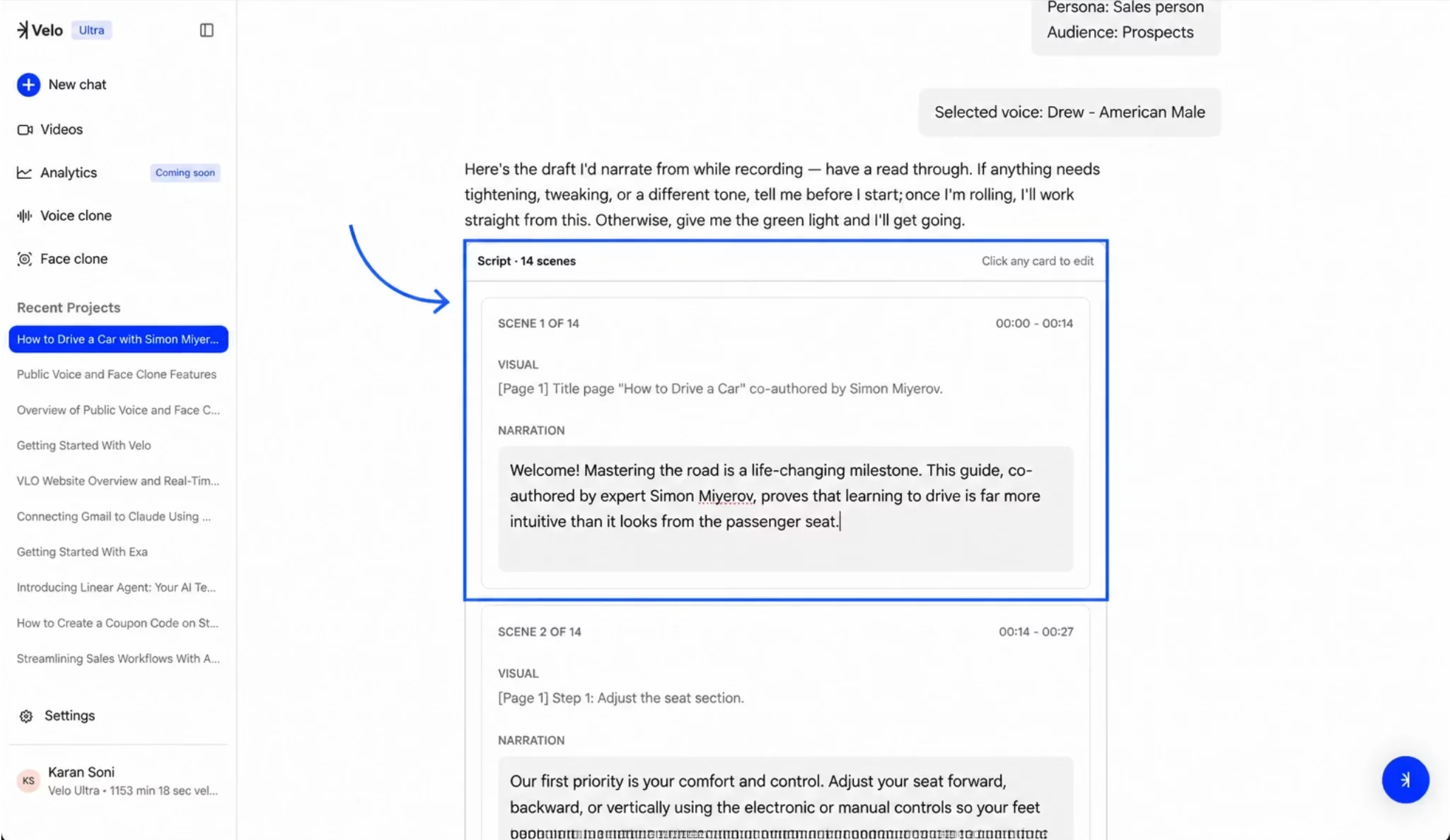
When a PDF is uploaded or a link is pasted into the system, the content is automatically processed and divided into a sequence of distinct segments. A single presentation or article might be broken down into 14 individual scenes, for example. This segmentation ensures that the narrative flow is manageable and that visuals are perfectly aligned with the spoken word throughout the project.
Screenshot 2026 05 26 At 11 53 00 PM
The Generator Velo interface displaying a script divided into scene cards.

Information Within a Scene Card

Each scene card acts as a detailed blueprint for a specific moment in the video. Every card contains three primary fields that define the output: VISUAL describes what will be shown on screen during the scene; NARRATION contains the exact text that will be spoken by the AI voice; and Duration (located at the top right of each card) displays the exact timestamps for the scene’s beginning and end.

How It Works

The scene cards work in a precise chronological sequence to build the full video. Scene 1 typically covers the opening — such as the first 14 seconds of the project and each subsequent scene immediately follows. This modular structure allows for granular control over the timing and content of each part of the script, ensuring the final narration matches the visual duration exactly.